Sound Like You: LinkedIn Creator Mode and Voice First AI for Freelancers

LinkedIn creator mode, in the sense that matters for this guide, is a personalized content service: AI drafts your posts and articles, a human edits them for voice, and you publish work that actually sounds like you. It helps freelancers, consultants, job seekers, and marketing professionals who need visibility but don’t have hours to spend staring at a blank post box. The goal isn’t more content. It’s content that gets read, remembered, and connected back to you.
TL;DR:
- AI drafts should be viewed as skeletons; adding unique details and personal voice significantly improve authenticity and engagement.
- A consistent weekly process that captures conversations, edits drafts, and logs successful hooks enhances long-term content performance.
- Following proven formatting rules, like short hooks, concise posts, and limiting carousel slides, increases visibility and completion rates.
- Engaging with comments promptly and rotating among specific topics builds a loyal, interactive audience over time.
- The LinkedIn Creator Mode toggle boosts profile visibility and analytics but does not replace the need for genuine, well-edited content.
Table of Contents
- What Does a LinkedIn Content Creator Service Actually Produce?
- How Do You Use AI Without Sounding Generic?
- A Weekly Workflow for Publishing Authentic LinkedIn Posts
- Which Post Formats and Prompts Work Best on LinkedIn?
- How Do You Measure Whether Your LinkedIn Content Strategy Is Working?
- What Are the Benefits of LinkedIn’s Official Creator Mode Toggle?
- How Do You Turn On Creator Mode on LinkedIn?
- How Do You Build and Engage an Audience as a LinkedIn Creator?
- What Mistakes Should You Avoid With LinkedIn Creator Mode?
- Why Voice-First AI Workflows Beat Pure Automation
- Get Personalized LinkedIn Posts Without the Blank-Page Problem
- Sources
- FAQ
What Does a LinkedIn Content Creator Service Actually Produce?
A LinkedIn content creator tool built around this model doesn’t just spit out generic captions. It works from what you already have and turns it into formats you can actually publish.
Typical outputs include:
- Single-post drafts built around one idea, one hook, one takeaway
- Article drafts for longer-form thinking pieces on LinkedIn’s publishing tool
- Carousel outlines that break a concept into slide-sized chunks
- Short-video scripts for talking-head or screen-recorded clips
- Content calendars that map ideas to a posting rhythm
The inputs work the same way in reverse. You can hand over a voice note recorded on your commute, paste in rough notes, upload a file, or let the tool pull context from your profile. A platform like Voselab’s LinkedIn post generator uses this kind of profile and voice data to shape drafts that sound closer to your own phrasing than a blank ChatGPT prompt ever will. The personalization comes from memory: the system tracks what you’ve written before and edits future drafts to match, rather than starting from zero every time.
How Do You Use AI Without Sounding Generic?
The single biggest mistake people make with AI-assisted LinkedIn content is publishing the first draft. Forbes is blunt about this: AI should be treated as a drafting and editing tool, never a final author, and the best results come from interview-style prompts that pull your actual voice out of you rather than letting the model invent one.
Here’s a short process that keeps drafts from reading like everyone else’s:
- Generate the draft, but treat it as a skeleton, not a finished post.
- Add one verifiable detail — a number, a date, a client outcome, something nobody else could have written.
- Insert one first-hand sentence in your own words, ideally something you’d actually say out loud.
- Cut hollow adjectives like “innovative,” “seamless,” or “game-changing” that add length without meaning.
- Break up long, multi-clause sentences into shorter ones a real person would say in conversation.
Eesel’s research suggests a large share of long-form LinkedIn posts in 2026 carry visible signs of unedited AI, and those posts tend to underperform ones that got a real edit pass. The tell isn’t the topic. It’s the rhythm: uniform sentence length, vague corporate phrases, and a total absence of anything only you could know.
Pro Tip: Read your draft out loud before publishing. If you stumble over a phrase or it doesn’t sound like something you’d say to a colleague over coffee, rewrite that line by hand.
If you want a deeper breakdown of which phrases give away AI authorship, Voselab’s post on sounding like ChatGPT walks through the specific patterns to hunt for.
A Weekly Workflow for Publishing Authentic LinkedIn Posts
Consistency beats intensity here. A five-step loop, run weekly, keeps content flowing without burning your Sunday afternoons.
- Capture. Record a 60 to 90 second voice note on your phone whenever something worth sharing happens. Attach three raw facts to each idea: a number, a name (or role), and an outcome.
- Draft. Feed the voice note or notes into your AI tool and ask for two or three hook-and-body variants, plus one carousel outline built from the same material.
- Edit. Go through each variant and replace any phrase you wouldn’t say aloud. Insert at least one concrete metric or a direct quote from the original story.
- Preview and schedule. Run the post through a LinkedIn preview tool to check where the “see more” truncation cuts off and how it renders on mobile, where most of your audience will read it.
- Iterate. Note which variant performed best and log the reason in a running “voice memory,” a simple file or note where you track which phrasing, hooks, and structures got traction.
That last step matters more than it looks. FutureFactors’ research on personal branding at scale points to a consistent pattern: creators who log what works and feed it back into their prompts see their AI drafts get closer to their real voice over time, while creators who start fresh every week keep getting generic output.
Weekly habits worth building into this loop:
- Keep a running list of three to five story ideas so capture never stalls
- Batch editing sessions instead of editing one post at a time
- Revisit old high-performers monthly to spot patterns in what resonated
If you’re translating between languages or writing English posts as a non-native speaker, this guide on common translation pitfalls covers the specific constructions that tend to read awkwardly when carried over directly from another language.
Which Post Formats and Prompts Work Best on LinkedIn?
LinkedIn rewards specific structural choices, and ignoring them is one of the fastest ways to lose a reader in the first three seconds.
Format rules worth following on nearly every post:
- Keep the hook under 15 words. Longer hooks lose the scroll-and-skim reader before they commit.
- Aim for a total post length of roughly 150 to 250 words. Shorter reads as thin; longer risks the truncation cutoff.
- Write in single-sentence paragraphs. Dense blocks of text look intimidating in a mobile feed.
- Cap carousels at 8 to 12 slides. Beyond that, completion rates drop.
- For short video, write captions built around a spoken cadence, not a written one. Scripts that read naturally out loud perform better on camera.
Spike AI’s research on prompt design backs a four-layer scaffold that consistently produces usable, platform-native drafts:
- Persona and intent. Tell the AI who you are and what you want this specific post to accomplish.
- Raw material. Feed in one real story, number, or quote. Not a topic. A specific thing that happened.
- Structure and constraints. Specify format (story post, framework post, carousel outline) and length.
- Guardrails. Tell it explicitly what to avoid: buzzwords, hashtag stacking, or a sales-pitch tone.
The Claude Code skill built for LinkedIn generation shows this scaffold in practical form, with separate commands for generating a post versus a carousel, plus a memory file that stores what worked. For examples of turning a client project into a story post, Voselab’s guide to B2B storytelling is a useful reference, and this breakdown of post anatomy covers hook-to-close structure in more detail.
How Do You Measure Whether Your LinkedIn Content Strategy Is Working?
Four metrics matter more than the rest: impressions, profile views, direct-message leads, and connection requests. Impressions tell you if your hook is working. Profile views tell you if the post made someone curious enough to check you out. DM leads and connection requests are the metrics that actually translate into freelance work or job opportunities, so weight them heaviest when judging ROI.
Cadence check: FutureFactors’ research found that consistent, regular posting produces stronger algorithmic signals than sporadic bursts of high-effort content. A realistic baseline is three posts per month, published on a fixed schedule rather than whenever inspiration strikes.
Three posts a month sounds modest, but it beats an ambitious daily plan that collapses after two weeks. Once you have a few weeks of data, feed the results back into your voice memory: which hooks got saves, which topics got comments, which format (story versus framework versus carousel) drove the most profile views. That feedback loop is what separates a content plan that improves over time from one that plateaus after the first month.
What Are the Benefits of LinkedIn’s Official Creator Mode Toggle?
Separate from the AI-assisted content workflow above, LinkedIn also offers a profile setting of its own, officially called Creator Mode, and it’s worth understanding even though it’s a different tool solving a different problem.
Turning on this feature reshapes how your profile presents to visitors. Your “Connect” button becomes a “Follow” button by default, which signals that you’re publishing for a broader audience rather than only networking one-to-one. Your featured content, including posts, articles, and newsletters, moves higher up your profile, making your best work the first thing a visitor sees instead of your job history.
The toggle also unlocks follower-level analytics that standard profiles don’t get, showing which posts are driving profile growth and where your audience is concentrated by industry or role. It surfaces a set of content-focused hashtags and topics on your profile header, giving visitors a quick sense of what you post about before they read a single update.
None of this replaces the harder work of actually writing posts worth reading. But for creators who are already publishing consistently, the toggle removes friction between good content and the people who’d want to see more of it. It’s a visibility setting, not a content strategy, and treating it as the latter is where a lot of profiles stall out.
How Do You Turn On Creator Mode on LinkedIn?
Activating it takes under a minute. From your profile page, open the “Resources” section (or “Dashboard” on some layouts), find the “Creator Mode” toggle, and switch it on. LinkedIn will prompt you to select up to five topics or hashtags that describe what you post about, so choose the ones that most accurately reflect your actual content, not just your job title.
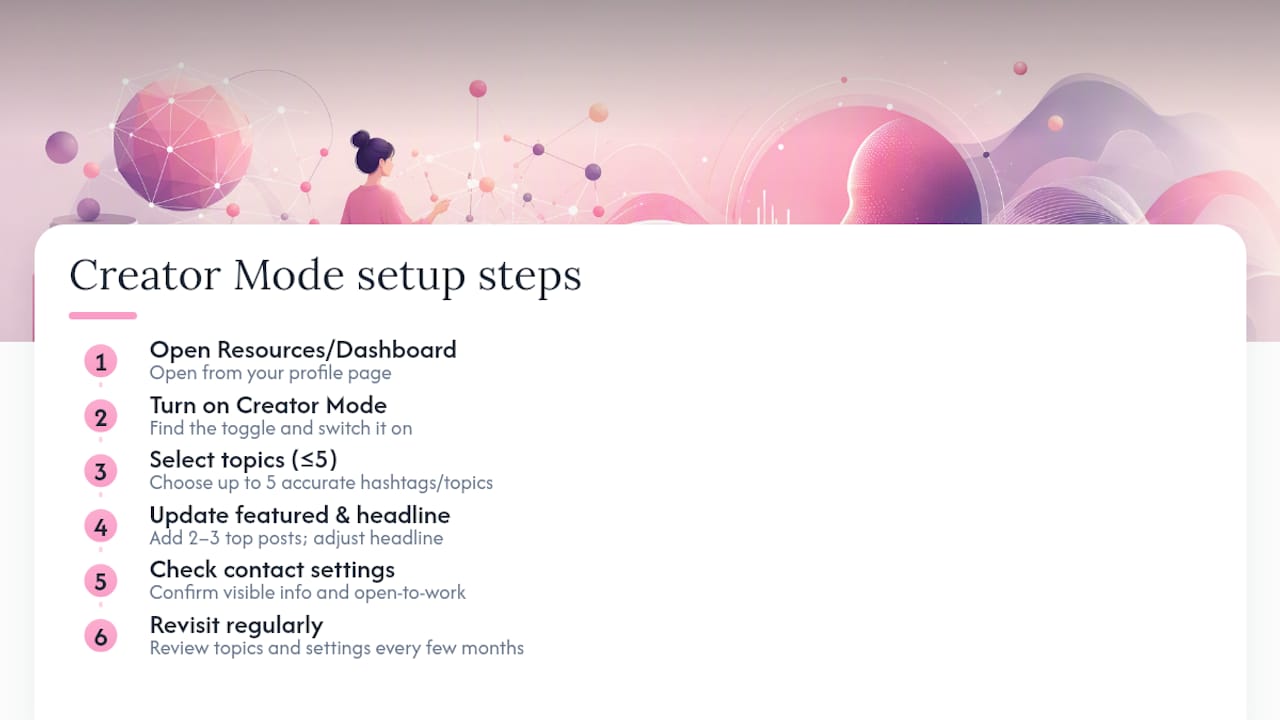
Optimizing it after activation matters more than the toggle itself. Update your featured section immediately with your two or three strongest posts or articles, since this becomes prime real estate on your profile once the toggle is live. Review your headline to make sure it reflects a creator identity, not just a job description. If you publish newsletters, link the most recent edition so new followers see it right away.
Check your contact info settings while you’re in there. Creator Mode surfaces your profile more broadly, so it’s worth confirming what contact details are visible and whether they still make sense for the volume of connection requests you might get. If you’re a job seeker, this is also the moment to make sure your open-to-work signals and contact preferences are aligned, since a more visible profile with outdated contact settings creates more friction than it removes.
Revisit these settings every few months. Topics you selected when you turned the feature on may not reflect where your content has drifted since.
How Do You Build and Engage an Audience as a LinkedIn Creator?
Growing a real audience on LinkedIn comes down to a small number of habits, repeated consistently, rather than any single tactic.
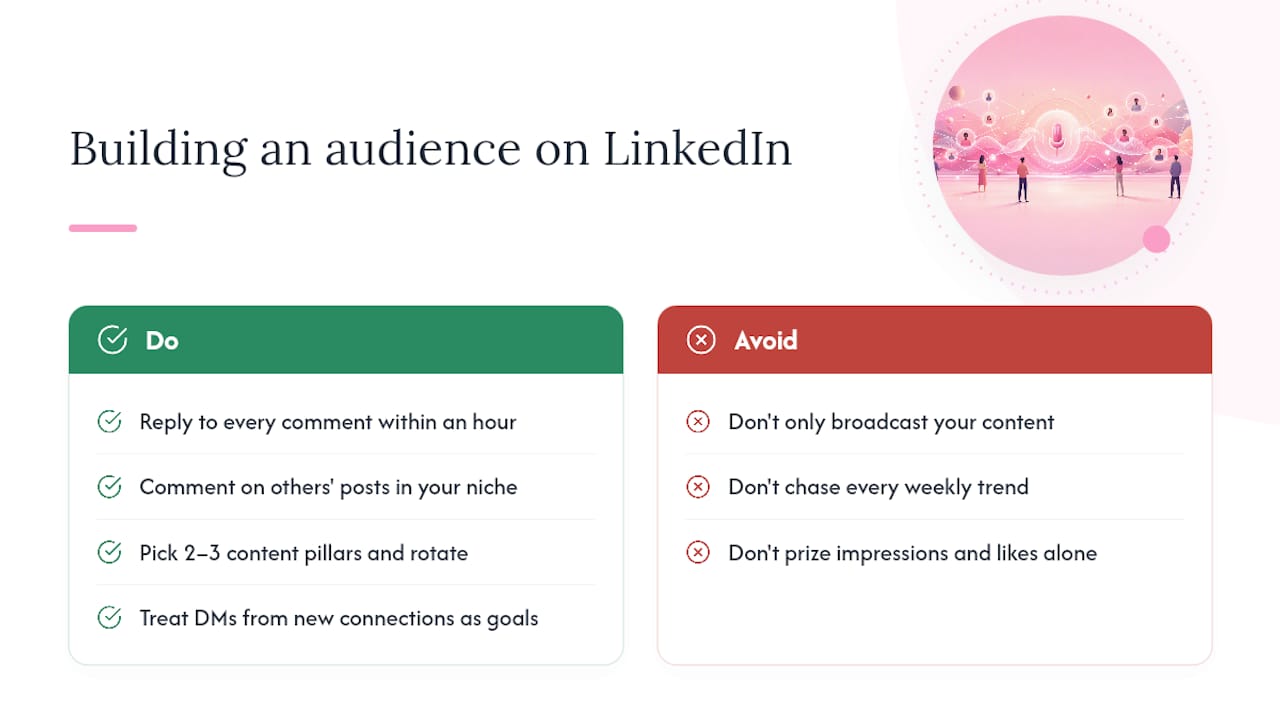
Reply to every comment on your posts within the first hour if you can manage it. Early engagement signals to LinkedIn’s algorithm that a post is worth showing to more people, and a thoughtful reply often turns a passive reader into a recurring one. Comment on other people’s posts in your niche before you ever ask them to engage with yours; reciprocity on LinkedIn is real, and creators who only broadcast rarely build a following that reciprocates.
Pick two or three content pillars, topics you can credibly speak to from direct experience, and rotate between them rather than chasing whatever trend is popular that week. Audiences follow creators for a specific expertise, and constantly switching topics makes it harder for anyone to know what you’re the person to ask about.
Engage with comments as content in their own right. A strong reply to a thoughtful comment sometimes gets nearly as much visibility as the original post, and it costs you two minutes instead of two hours.
Finally, treat DMs from new connections as the actual point of the exercise. Impressions and likes are vanity metrics if they never turn into a conversation. A smaller, engaged following that regularly messages you about work is worth more than a large one that only scrolls past.
What Mistakes Should You Avoid With LinkedIn Creator Mode?
The most common mistake is publishing AI drafts unedited, which produces the flat, interchangeable tone that experienced LinkedIn users spot within the first sentence. A second, closely related mistake is turning on the profile’s Creator Mode toggle and assuming it will do the work of an actual content plan. The toggle changes how your profile presents; it does nothing to generate the posts that make people want to follow you.
Posting inconsistently is another frequent trap. A burst of five posts followed by three weeks of silence resets whatever algorithmic momentum you built, and followers who engaged with your last post may not see your next one months later.
Ignoring comments is a mistake that compounds quietly. Every unanswered comment is a missed chance to deepen a connection that could become a client, a referral, or a job lead. Selecting topics or hashtags in Creator Mode that don’t match your actual posting habits also undercuts the feature. If you tag yourself under a topic you rarely post about, you’re signaling an identity your content doesn’t back up.
Last, treating every post as a sales pitch burns out an audience fast. The creators who build lasting followings mix genuine insight, personal story, and useful frameworks, with direct offers appearing rarely enough that they still land when they do show up.
Why Voice-First AI Workflows Beat Pure Automation
I’ve watched enough LinkedIn feeds fill up with interchangeable AI posts to know the problem isn’t the AI. It’s the absence of a human editing pass. Voselab’s approach leans on the same principle: a personalization algorithm shapes the draft, but the raw material, your voice notes, your specific numbers, your actual client stories, has to come from you.
The practical rule I keep coming back to: reserve roughly a fifth of every post for something fully human-authored. A phrase only you would use. A detail no AI could invent. That fifth is what makes the other four-fifths worth reading.
— Nurym
Get Personalized LinkedIn Posts Without the Blank-Page Problem
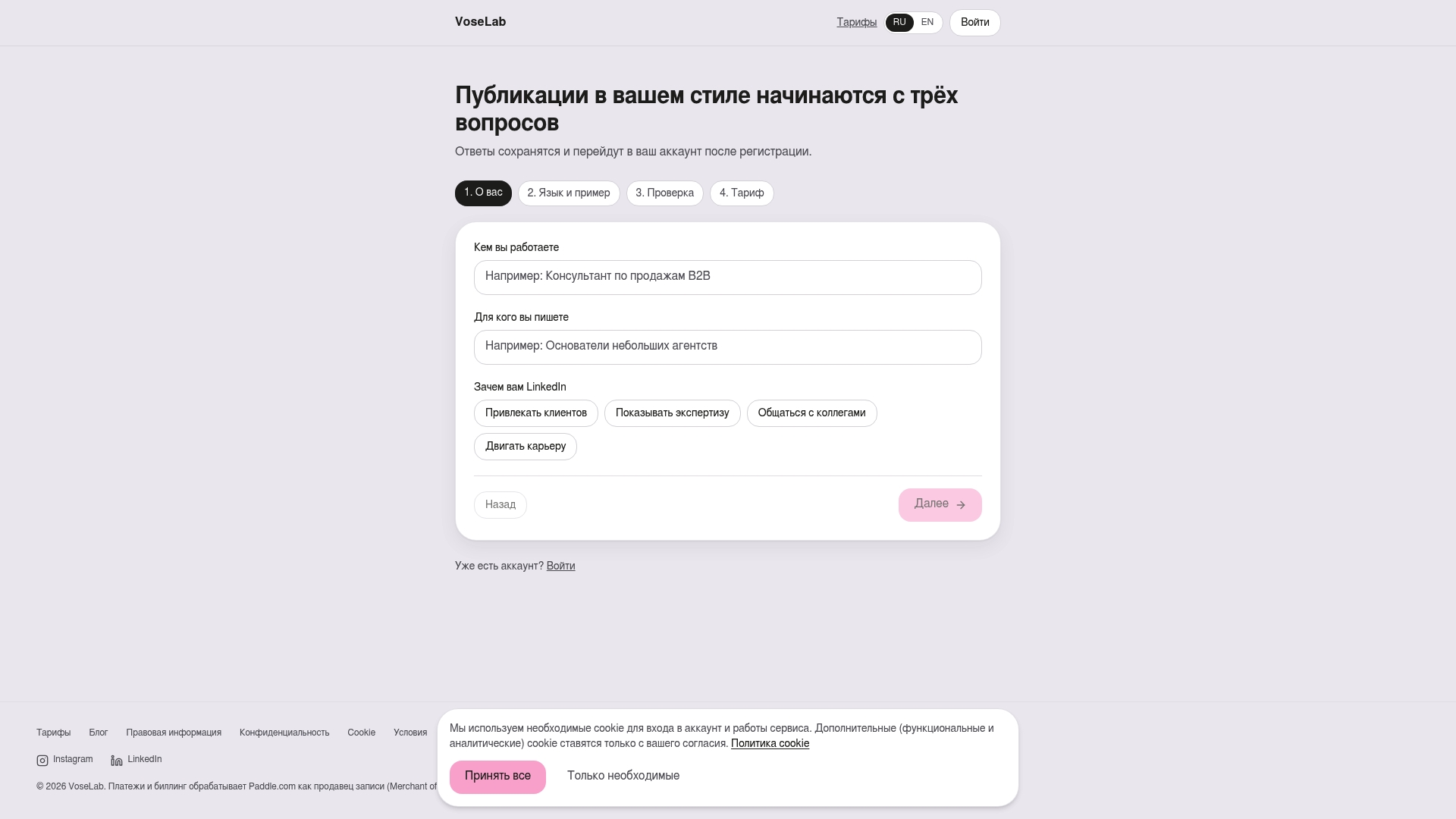
Voselab turns your raw material, a voice note, a rough draft, a client story you’d rather not spend an hour formatting, into an editable LinkedIn post or article shaped by an algorithm trained on your own profile and phrasing. It supports both English and Russian, accepts input as text, file, or voice, and hands you back a draft you edit rather than one you have to write from a blank page.
If you’re a freelancer chasing your next client, a job seeker trying to stay visible, or a consultant who knows LinkedIn matters but never has time to write for it, this is built for exactly that gap. The free trial covers one full post, allowing you to try the service before committing to a subscription. Start your first personalized post at Voselab and judge the fit for yourself.
Sources
- 6 ChatGPT prompts that write expert LinkedIn posts in your unique voice — Forbes
- LinkedIn Content Generation — Claude Code Skill — GitHub
- AI LinkedIn personal branding in 2026: what actually works — FutureFactors
- AI LinkedIn post generator: a 2026 guide that won’t make you sound generic | eesel AI
- The B2B marketer’s guide to AI prompts for LinkedIn posts, profiles, and DMs — Spike AI
FAQ
Is LinkedIn Creator Mode the Same as an AI Content Service?
No. LinkedIn’s Creator Mode is a profile toggle that changes visibility and analytics. A personalized content service like Voselab generates the actual posts and articles you’d publish.
Can AI Write a Full LinkedIn Post By Itself?
It can draft one, but Forbes and Eesel both recommend heavy editing before publishing, since unedited AI drafts tend to underperform humanized ones.
How Often Should I Post on LinkedIn as a Creator?
A baseline of three posts per month, published on a fixed schedule, gives the algorithm enough consistent signal to build momentum without requiring daily output.
What’s the Fastest Way to Sound Less Like a Chatbot?
Add one specific, verifiable detail (a number, date, or outcome) and one sentence you’d actually say out loud, then cut any phrase that sounds like corporate filler.
Does Voselab Support Languages Other Than English?
Yes. Voselab generates personalized LinkedIn content in both English and Russian, and accepts input as voice, text, or uploaded files.